
SCAN~LINK Passive RFID Safety System Support and Technical Resources
Find SCAN~LINK support resources for the Armour System™, SCAN~VUE™, RapidPair™, and related passive RFID safety products. Access troubleshooting guides, user manuals, software downloads, schematics, and answers to common questions about installation, operation, and maintenance.
Use these resources to resolve issues quickly and keep your detection system running reliably on site. If you need further help, please reach out and our support team would be happy to help.

Warranty Disclaimer
There are no user-serviceable or replaceable parts inside of any piece of Apparel, the Antenna or the In-Cab Display, and opening or attempting to open any component or apparel will void the product warranty. Attaching un-approved devices or fixtures to any SCAN~LINK component or apparel is likely to negatively affect performance, and may also void any warranty.
Troubleshooting



Documentation
Manuals
Product Briefs (Specifications)
Product Bulletins
Schematics
Warranty Documentation
Maximum Permissible RF Exposure Limits
Software Downloads
How-To Video Tutorials
Watch step-by-step tutorials for common SCAN~LINK setup and configuration tasks. For deeper troubleshooting, use the guides above or contact our support team.
How To Adjust Detection Range
See how to adjust detection range for your application and equipment setup.
How To Pair Antenna Unit to Display Unit
Follow the steps for pairing an Antenna Unit with an In-Cab Display Unit.
How To Install RapidPair™ Software
Learn how to install RapidPair™ software so you can pair and configure your SCAN~LINK Armour System™.
Searching for more information? Check the FAQ section below for quick answers. If your question is not covered, reach out and our team will be happy to help!
FAQs
Find answers to common questions about SCAN~LINK's passive RFID detection systems, installation, and worksite applications.
What is a proximity detection system?
Learn MoreA proximity detection system alerts equipment operators when a person or object enters a defined zone around their machine. SCAN~LINK's Armour System™ uses passive RFID to do this. An antenna on the equipment detects passive RFID tags built into worker safety apparel and Marker Tags. When a tag enters a detection zone, the operator receives a visual and audible alert, and the event is recorded.
How does the SCAN~LINK Armour System™ work on a jobsite?
See How it WorksAntenna Units mounted on heavy equipment create detection zones around blind spots and hazardous areas. Workers wear high-visibility vests embedded with passive RFID tags and/or hard hats with passive RFID tags affixed to them. When a tagged worker enters a zone:
- The operator receives visual and audible alerts on the In-Cab Display
- The ground worker hears an audible warning from the External Alarm mounted on the machine
- The system logs the detection event in SCAN~VUE™
Because the system responds only to SCAN~LINK passive RFID tags, alerts are tied to tagged workers and assets rather than general objects or debris.
Is SCAN~LINK compatible with our existing fleet of mixed equipment?
Yes, SCAN~LINK's passive RFID technology integrates seamlessly across mixed fleets without requiring specific equipment brands or models. It can be installed on excavators, wheel loaders, skid steers, backhoes, dozers, graders, dump trucks, forklifts, and other mobile equipment. Any SCAN~LINK-equipped machine can detect any worker wearing SCAN~LINK passive RFID PPE.
What equipment modifications are needed for installation?
View Rental Equipment SolutionsStandard installations require only mounting the Antenna Unit(s), In-Cab Display, and External Alarm, then connecting power from the equipment's electrical system. Most installations are completed within hours with minimal disruption to daily operations.
For rental, leased, or temporary equipment, SCAN~LINK offers non-invasive and portable options. These include magnetic mounts that require no drilling or permanent modification and an optional battery pack, so the system can move between machines quickly.
How does SCAN~LINK perform in harsh weather environments?
SCAN~LINK Antenna Units use rugged, sealed, industrial-grade enclosures built for dust, debris, rain, snow, and temperature swings. Passive RFID does not rely on lighting or limited visibility, so detection continues in low light, dust, and dirt. It can also detect tagged workers who are partially hidden by material.
*Performance can vary on very busy sites with heavy radio frequency (RF) activity. See the Busy Sites and Noisy RF Environments application note in the Troubleshooting section for guidance.
What detection range does the SCAN~LINK Armour System™ support?
The SCAN~LINK Armour System™ can detect tagged workers within customizable zones around equipment, with an adjustable detection range of up to 30 feet (approx. 9.1 metres).
Single, dual, and 3.0 multi-antenna configurations let you build one to four detection zones around a machine. Our team can recommend the right setup for your equipment and site conditions.
What ongoing maintenance is required?
SCAN~LINK requires virtually no ongoing maintenance. Passive RFID tags in SCAN~LINK apparel and Marker Tags have no batteries to charge or replace, and they have a typical service life of 20+ years. Antenna Units and In-Cab Displays are sealed and built for long-term use. The In-Cab Display runs self-diagnostics to confirm the system is connected and working.
To check tag condition, use the Desktop Tag Health Tester available in Software Downloads.
NOTE: There are no user-serviceable parts inside any SCAN~LINK component or apparel. Opening a component will void the product warranty.
Do operators need specialized training?
Operators do not need specialized training to respond to alerts. Display Legend stickers are available inside the cab for both 2.0 and 3.0 In-Cab Display Units, giving operators a quick reference when needed.
A brief walkthrough at installation covers alert meanings, volume settings, and the operator mute function (if using a 3.0 Display Unit). Safety managers can review detection data through the SCAN~VUE™ dashboard.
Additionally, operators can find detailed Display Legend documents on this page under the 'Troubleshooting' section.
How does SCAN~LINK support compliance and safety reporting?
Each detection event is logged with the time, date, and tag ID. SCAN~VUE™ turns these logs into reports that help safety teams document near misses, show due diligence, and support internal audits and regulatory reporting.
Please note: The SCAN~LINK Armour System™ is not a safety-rated device and must not be relied upon as the sole means of protection. It is designed to enhance operator awareness and support existing site safety procedures. Safe equipment operation remains the responsibility of the operator and site management at all times.
What is SCAN~VUE™?
Learn About SCAN~VUESCAN~VUE™ is SCAN~LINK's safety telematics and analytics platform. It collects detection events from your Armour System™ and presents them as near-miss data, reports, and visual insights that jobsite leaders can use to improve safety programs. Existing users can sign in at the SCAN~VUE Login
What analytics and reporting does SCAN~VUE™ provide?
SCAN~VUE™ helps safety teams find patterns and act on them early.
Key capabilities include:
- Detection event logging with timestamps and personnel and equipment IDs
- Heat maps that shows where detections happen most often
- Trend analysis of near-miss activity over time
- Automated reporting for safety meetings, audits, and leadership updates
These insights help you identify righ-risk areas, adjust site layouts or procedures, and track progress over time.
How do I know whether I need 2.0 or 3.0 support documents?
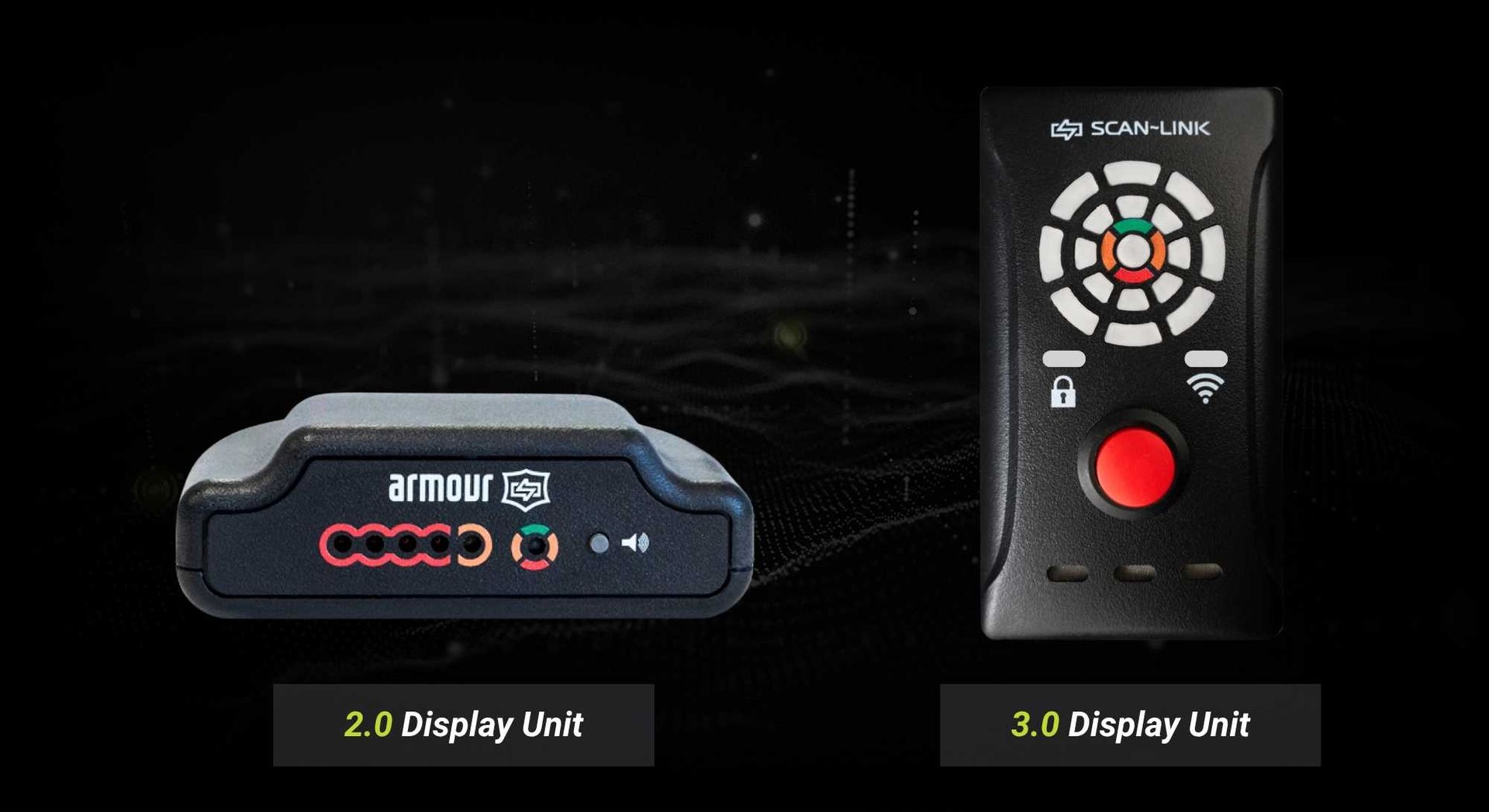
The quickest way to tell is the In-Cab Display. The 3.0 In-Cab Display has a 360º LED directional ring that shows detection zones around the machine. The 2.0 Display Unit does not.
Once you know your version, use the matching error code legend, user manual, and RapidPair™ (v1.6 for 3.0, v1.3 for 2.0). If you're still unsure, contact our support team.
What should I check first if the system is not detecting apparel or Marker Tags?
Start with these checks:
- Confirm the In-Cab Display is in its Ready state. A flashing yellow light or error code points to a connection or system issue. Use the error code legend for your version.
- Check the tag. Make sure that the vest, hard hat tags, or Marker Tags have no visible damage. The Tag Health Tester can confirm that a tag is reading correctly.
- Check zone and range settings. Confirm the tag is inside the configured detection zone and that antenna orientation has not shifted.
For step-by-step guidance, see Step One: Basic Troubleshooting Steps, Apparel Isn't Being Detected, and Marker Tag Isn't Being Detected in the Troubleshooting section.
What is the difference between worker detection alerts and Marker Tag alerts?
Explore Marker TagsMarker Tags trigger a distinct audio cue that sounds different from worker detection alerts. Operators can tell right away whether they are near a tagged person or a tagged fixed asset, such as a pipe, wellhead, column, or bin, and respond with the right level of caution. Both tag types are passive RFID and work with the same Antenna Units, so asset detection does not require separate hardware.
Still Have a Question?
If you can't find the answer above, our team can walk you through it and help you get the most from your system.
We're Here to Support Your Safety Goals
Contact us to learn how SCAN~LINK’s passive RFID safety solutions improve safety and compliance, or request pricing and a detailed quote tailored to your jobsite.
Contact Us
Contact Us
13 Windward Dr.
Unit 204
Grimsby, Ontario
L3M 4E8
T: 1-905-304-6100
Toll Free: 1-866-554-5582
info@scan-link.com